
A practical buyer's guide to smart lockers
This guide helps you understand how smart lockers could support your organisation, define your requirements and compare options before making a purchasing decision.
It explains how smart lockers can be used, how they work, what to consider when choosing a system and which questions to ask suppliers. It is designed for facilities, operations, IT, procurement, property and estates teams exploring smart lockers, defining their requirements or reviewing an existing system. Examples include corporate workplaces, universities, NHS and healthcare settings, residential and commercial developments, and manufacturing sites, where requirements can vary in terms of access, security, compartment sizes and reporting.
Read it from start to finish or use the contents to find the sections most relevant to your requirements and stage in the buying process.
Understanding the terms in this guide
- Compartment: the individual space behind a locker door where items are stored.
- Locker bank: a group of compartments installed together.
- Smart locker system: the physical lockers and software used to manage access, notifications and activity records. A system may cover one or several locker banks across different locations.
- Workflow: the sequence of steps for using and managing the lockers. It defines how someone books, deposits, collects or returns an item, who can access it, and what notifications and records are created.
- API (application programming interface): a way for other software to communicate with the locker system and request actions. APIs allow developers to connect lockers to existing systems and build tailored workflows, such as reserving a locker when a visitor books and pays for an event ticket.
- Chain of custody: a record that follows an item as it passes between people or teams, showing who had it, when it changed hands and who received it next. It helps establish responsibility if an item goes missing or a handover is disputed.
- Audit trail: a time-ordered record showing what happened in the locker system, when and who carried it out, such as opening a compartment or changing an access permission. It helps teams investigate problems, identify unauthorised activity and provide evidence for compliance reviews.
A smart locker provides a secure, self-service way to manage the delivery, storage, collection and exchange of items. Software controls how locker compartments are assigned, who can access them and how each item moves through the process. Where a more tailored approach is required, APIs can be used to create the type of locker workflow and user experience an organisation needs.
For an incoming delivery, the item is registered and a suitable locker compartment is assigned. An authorised user accesses the assigned compartment, scans the item and deposits it into the locker. The recipient is notified automatically and follows the configured process to collect it.
Access can be provided through a barcode, QR code, PIN or an ID badge, depending on the workflow and configuration. Additional identification checks, including a signature or photograph, can also be included where required.
The system records key stages in the process, providing visibility of when an item is deposited, accessed or collected.
Smart lockers are used to manage deliveries, collections, returns, shared equipment and temporary storage through a secure, self-service process.
Incoming parcel management is one of the most common uses. Deliveries are placed into secure compartments, recipients are notified automatically and items can be collected without requiring reception or facilities teams to manage each handover.
Smart lockers can also be used to issue and return shared assets and equipment, including laptops, keys, tools, scanners, PPE and medical devices. The system provides a record of who has each item and when it was issued or returned, supporting visibility and chain of custody.
Other workflows include day-use storage for employees, visitors and contractors; click and collect for prepared orders; secure self-service returns; and chargeable storage that users can reserve or access for a defined period.
Many organisations use more than one workflow within the same deployment. A corporate workplace may combine incoming parcel management with equipment exchange and temporary storage. A university may use parcel lockers in student accommodation alongside equipment lockers in academic or technical departments. A residential development may provide indoor or outdoor parcel lockers where no concierge or on-site team is available.
The right workflow and configuration depend on the items being managed, who needs to access them and how the process needs to operate.
Smart lockers are used across corporate workplaces, universities, healthcare, residential developments, manufacturing, retail, leisure and other managed environments.
The teams involved depend on the workflow. Facilities and operations teams may manage incoming deliveries and temporary storage, while IT and asset management teams oversee the issue and return of shared equipment. Property and estates teams use lockers to manage parcel deliveries across buildings, while retail, leisure and venue teams may use them for click and collect, returns or chargeable storage.
The common requirement is a secure and consistent way to manage items, with visibility of when they are deposited, accessed, collected or returned.
The team purchasing the lockers may not be the team managing them day to day. Include operational users, IT, security and procurement when defining the requirements and evaluating potential systems.
Most organisations already have a process for managing deliveries, shared equipment and temporary storage. It may rely on reception or facilities teams, spreadsheets, paper records or knowledge held by individual employees. The process may work at lower volumes but become harder to manage as demand, locations or user requirements increase.
A delivery arrives and someone accepts it, finds somewhere to store it, records the details and notifies the recipient. Shared equipment may leave a department without a clear sign-out record. A contractor may need temporary storage, requiring the on-site team to arrange an informal solution.
Then the questions begin:
- ‘Has my parcel arrived?’
- ‘Where has the laptop been stored?’
- ‘Who signed out the keys?’
- ‘My parcel was marked as delivered, but I never received it.’
Each task or query may take only a few minutes. Repeated across multiple items, people and locations, however, they can create a significant administrative burden. The work may also be spread across reception, facilities, IT and property teams, making the full cost and impact difficult to see.
As volumes and complexity increase, items may be stored wherever space is available, equipment may go untracked and different sites may develop their own processes. When an item is missing, returned late or disputed, it can be difficult to establish what happened.
Before evaluating smart lockers, assess how the current process operates. Consider:
- How many deliveries, equipment requests and storage needs are managed each month
- How much time employees spend accepting, recording, storing and handing over items
- What happens when an item is not collected or returned Whether there is a reliable record of each deposit, collection, issue and return
- Whether the process is consistent across sites, buildings or departments
- How often employees respond to queries, complaints or disputes
This provides a clearer view of the time, cost and operational issues associated with the current process, and the requirements any alternative solution would need to meet.
The cost of a manual process rarely appears as one line in a budget. It is spread across the time employees spend accepting, recording, storing and handing over items, answering queries and investigating missing or disputed items. To establish a baseline, record monthly volumes, average handling time, time spent resolving exceptions and the cost of lost or untracked items. This gives the organisation a more credible basis for comparing its current process with other options.
When considering smart lockers, compare how they would manage your deliveries, shared equipment or storage with your current arrangements. The table below explains how each approach works, its benefits and how it compares with smart lockers.
These approaches can also work together. For example, a mailroom team may receive and register deliveries, with smart lockers providing a self-service collection point.
| Approach | How it works | Benefits | Compared with smart lockers |
|---|---|---|---|
| Smart lockers | Software assigns compartments, controls access, sends notifications and records deposits, collections and returns. |
|
|
| Traditional lockers | Users store items in compartments secured by a key, combination or standalone electronic lock. |
|
|
| Reception or concierge-managed deliveries | Staff accept, record and store parcels, notify recipients and hand them over at collection. |
|
|
| Dedicated mailroom or goods-in function | A central team receives, records and sorts deliveries for distribution or collection. |
|
|
| Manual equipment sign-out | Staff record equipment loans and returns in a spreadsheet or paper log. |
|
|
| External collection points | Recipients collect parcels from a third-party parcel shop or carrier-operated locker. |
|
|
The next step is to define what your smart lockers need to do, who will use them and how they will fit into your organisation. This gives suppliers a clear brief and helps you assess their proposals against the same requirements.
Consider:
- Items and volumes: What will be stored, collected or returned? Record typical item sizes, daily volumes, peak demand and how long items are likely to remain in a compartment.
- Users and access: Who will deposit and collect items? Define access hours and consider employees, couriers, residents, visitors and users with accessibility needs.
- The workflow: Identify each step, from registering an item or reserving a compartment through to collection or return. Establish where staff involvement is needed.
- Location: Identify suitable indoor or outdoor positions, available space, power and connectivity. Consider how users and delivery teams will reach the lockers.
- Records and oversight: Decide what you need to know about deposits, collections, equipment loans and returns, who needs access to that information and whether reporting must cover several sites.
- Connections with other systems: Identify any apps, booking platforms or business systems that need to work with the lockers, including workflows that may require APIs.
- Day-to-day management: Agree who will manage the system, help users and deal with oversized items, full compartments, overdue returns or uncollected deliveries.
Record these requirements in a brief, distinguishing what is essential at launch from what may be needed later.
Define which requirements should be consistent across all locations and where local differences are necessary. Sites may need different compartment sizes, access hours or workflows while sharing central administration and reporting. Ask suppliers to show how permissions, site-level reporting and additional locations would be managed.
Smart locker workflows allow people to collect deliveries, borrow equipment or store personal belongings through self-service access. The workflow determines how a compartment is assigned, who can access it, what notifications are sent and which activities are recorded. An organisation may need more than one workflow to support these different uses. The examples below explain how each one works.
Parcel lockers
Asset and equipment lockers
Day-use lockers
Click and collect lockers
Returns lockers
Chargeable storage lockers
Start with what you need the lockers for, then consider how other teams could use them. A workplace introducing parcel collection may also need lockers for employees to borrow equipment or visitors to store their belongings. Considering these uses early helps you decide how much space you need and what the software needs to support.
Each use may need different access permissions, compartment sizes and storage periods. Ask the supplier whether they can share a locker bank or need dedicated compartments or separate banks.
Smart locker software manages access, compartment assignments and notifications. APIs allow organisations to build on these capabilities, connecting lockers with existing systems and tailoring how people book, deposit, collect or return items.
The examples below show how this can work.
- Equipment loans: An employee requests a laptop through the organisation’s IT service portal. Once approved, the portal uses the locker API to reserve a compartment. Collection and return updates are sent back to the IT system so the team can track the loan.
- Events and leisure: A visitor books and pays for a locker alongside their event ticket. The ticket-booking system handles the payment and uses the locker API to check availability and reserve a compartment, so both payment and storage are arranged before they arrive.
- Click and collect: A customer orders through a retailer’s website. The order system uses the locker API to reserve a compartment and receives a deposit update when staff load the order, triggering the customer’s collection notification.
Ask the supplier to demonstrate the process you have in mind. Check what the software already supports, what needs additional development and who will build, test and maintain any integration. Any additional work should be included in the quote and project timetable.
When considering smart lockers, you may want deliveries from any courier, but only for your residents, employees or students. This is different from hosting a public collection point.
The terms “open” and “closed” can cause confusion because they describe the network, rather than simply which couriers can deliver. A closed network can accept deliveries from multiple couriers while keeping the service dedicated to your organisation.
What is an open locker network?
An open locker network typically forms part of a wider parcel collection and returns service. An external operator manages the network and determines which carriers, retailers and services it supports.
People select the location when arranging a delivery or return. If the lockers are installed at a residential development or workplace, the service may also attract people who do not live or work there. Each person can only access the compartment authorised for their transaction.
This can suit a site that wants to offer a public parcel collection point. However, the host needs to understand who will visit, when they can access the site and how locker capacity is shared.
What is a closed locker network?
A closed locker network is dedicated to an organisation, site or defined group of users. The lockers could serve residents in a development, employees in a workplace or students on a campus.
Multiple couriers may still deliver to the lockers, depending on the system and agreed process. The difference is that the service and available compartments are intended for those users, rather than the wider public.
The organisation can also define requirements for access, notifications, storage periods and reporting, within the capabilities of the supplier’s software. The lockers may support other uses, such as equipment loans or temporary storage.
What does this mean in practice?
A property manager may initially ask for an open network because residents order from many retailers and receive deliveries from different couriers. What they actually need is a system that accepts those deliveries while keeping locker capacity available for residents.
A closed network can meet that requirement. Residents receive their collection details, couriers follow the agreed delivery process, and the building does not become a public collection destination.
You decide who can use the lockers, which workflows they support, how notifications are sent and who can access reports. You can manage locker activity centrally through a single platform, with visibility of deposits, collections and returns across your sites.
Multiple couriers can make deliveries, while the lockers remain dedicated to your residents, employees, students or customers. They are not available for the general public to use as a parcel collection or returns point.
Smart lockers serve different purposes across sectors. For some, the priority is managing incoming deliveries. For others, it is making shared equipment available when needed or providing temporary storage for staff and visitors. Each setting has different requirements for access, space and day-to-day management.
Click on a sector below to see how smart lockers can be used in that setting.
Corporate workplaces are varied. Employees may work on site full time, follow a hybrid pattern with a few days in the office, or work remotely and visit to collect deliveries or equipment. Reception and mailroom teams need space to store deliveries and time to hand them over alongside their other responsibilities. Parcel lockers let employees collect without waiting for a staff handover.
Equipment lockers can support the collection and return of laptops, meeting room equipment and access cards, including outside IT or facilities service hours where building access permits.
Where employees use shared desks, day-use lockers provide somewhere to leave bags and personal belongings while they work. Visitors and contractors can also use them during their time on site.
Consider how many people use the workplace on busy days, when they need access and how long deliveries or belongings will remain in the lockers.
Schools, colleges and universities use shared laptops, tablets, cameras and teaching equipment across departments and courses. Equipment lockers provide a designated collection and return point, with loan periods suited to the department or course. Access can be restricted to authorised students and staff to help keep equipment secure, while records of each handover help teams follow up on items that have not been returned.
In university accommodation, parcel deliveries can put pressure on porters’ lodges and reception teams, particularly at the start of term and during busy shopping periods. Traizr’s analysis of eight London student accommodation sites found October parcel volumes were 78% above an average month, while 62% of parcels remained in the mailroom four hours after arrival.¹ Storage needs to accommodate both incoming deliveries and items waiting for collection.
With smart lockers, students will be able to collect after lectures or in the evening, even when the mailroom or reception is closed. They will not need to wait for staff to hand over their delivery.
Day-use lockers can also give students somewhere to leave bags and personal belongings while using libraries, workshops or shared study spaces.
In NHS and healthcare environments, staff need shared equipment available when it is required, including during night shifts and weekends. When medical devices, laptops or scanners move between departments without a clear handover record, staff can spend time searching for them instead of carrying out their other duties.
An NHS England case study at Princess Alexandra Hospital shows how much time this can take. Searches for missing devices, including theatre equipment, took an hour on average. Wheelchairs and controlled-drug cabinet keys could take up to four hours to locate, while staff spent around eight hours a week searching for just 15 patient-warming devices.2
Equipment lockers give authorised staff a designated place to collect and return suitable items. A record of who collected each item and when it was returned supports chain of custody and helps teams follow up on missing or overdue equipment. Controlled access can also support the secure handover of sensitive documents.
Prescription collection creates another demand on staff time. In May 2025, NHS England estimated that 45% of calls to community pharmacies concerned whether a prescription was ready.3 Locker collection, supported by notifications, can give patients a clear collection point once their prescription has been prepared, where the service and storage arrangements are suitable.
Consider which staff or patients need access, where collection points will be most useful and what records are required. Medical equipment may need cleaning, charging or inspection before reuse, while prescription collection needs to follow the pharmacy’s dispensing, storage and patient-verification procedures.
Government departments, councils and police teams manage items ranging from shared laptops and keys to confidential documents and evidence. These items need secure storage, access for authorised people and a clear record of each handover.
More than 2,000 laptops, phones and tablets were recorded as missing across 18 Whitehall departments and public bodies, with an estimated annual replacement cost of £1.3 million.4 Equipment lockers can provide a designated place for staff to collect and return shared devices, with records that help teams identify outstanding returns and investigate missing items.
For police teams, evidence handling has consequences beyond the cost of replacing an item. The London Assembly reported that more than 30,000 criminal cases collapsed over four years where evidence was lost, damaged or missing.5 Appropriately configured lockers can support secure evidence handovers, restricting access to authorised personnel and recording deposits and collections as part of the wider chain of custody.
Consider who needs access, which handovers need recording and whether items require specialist storage. Shared equipment, confidential documents and police evidence have different requirements and should not be treated as one workflow.
UK parcel volumes reached 4.2 billion items in 2024–25, up 7.1% on the previous year.6 Citizens Advice reported that 15 million people experienced a problem with their latest delivery, with 24% reporting that their parcel had been left in an insecure location.7
In buildings with a concierge, accepting, storing and handing over parcels takes time away from other resident services. Without an on-site team, deliveries may be left in communal areas or returned to the depot when residents are out.
Parcels left in entrances, corridors or stairwells can be stolen, misplaced or damaged. They can also create trip hazards and obstruct access routes. Parcel lockers provide a dedicated, secure storage point, reducing the need to leave deliveries in shared spaces.
Concierge teams can load deliveries, or couriers can deposit them directly where the system is configured for this. Residents collect without arranging a staff handover, while delivery and collection records help property managers investigate missing-parcel queries.
For property developers, locker space, power, connectivity and courier access should be considered during building design. In existing developments, the location needs to work for residents and delivery drivers while keeping access routes clear. Outdoor-rated lockers may be appropriate where indoor space is limited.
Property managers responsible for several developments can manage locker activity centrally through a single platform, with visibility of deliveries and collections across their sites.
Tools, keys, scanners and other shared equipment need to be available when a shift begins and returned ready for the next user in manufacturing environments. Missing items can delay work, while incomplete handover records leave supervisors trying to establish who last used them.
In a survey of 250 senior manufacturing professionals published by Pathfindr, 60% said vital tools were unavailable when required, causing production delays. The research also reported an average of 2.5 hours a week spent locating tools and components by manufacturing employees.8
Equipment lockers provide a designated collection and return point for employees across shifts. Access can be limited to authorised staff, with records showing who collected an item and whether it has been returned.
At shift changes, several employees need to collect equipment at once, so locker capacity and location should support those busy periods. Compartments need to accommodate the items being stored, with charging available for devices that require it. Staff also need a clear way to report faults and separate damaged equipment so it is not issued again.
Customers visiting a store to collect online orders or return purchases can add to queues during busy shopping periods. Staff need to retrieve prepared orders, accept returns and answer questions alongside their other responsibilities.
Research by Clix Technologies, reported by InternetRetailing in 2024, identified queues and inconvenient opening hours as barriers to using collection services. 23% of respondents cited queues, while 25% wanted to collect outside normal store hours.9
Click and collect lockers let staff load orders ahead of the customer’s arrival. Customers can then collect without waiting at a service counter. Lockers accessible from outside the store can also allow collection after closing.
Returns lockers give customers somewhere to drop off purchases, including online orders, without queuing at a staffed counter. Staff collect the items for inspection and processing afterwards. Customers should receive confirmation of the drop-off and clear information about when their return will be processed.
Locker capacity and compartment sizes need to accommodate peak order volumes and larger purchases. Clear collection deadlines and reminders help prevent uncollected orders occupying space needed for others.
Visitors to venues and attractions such as museums, immersive experiences, galleries and leisure centres need somewhere secure to leave bags, coats and other belongings. At venues with fixed entry times, many visitors arrive together, putting pressure on cloakrooms and staffed storage points.
Lockers allow visitors to store and retrieve their belongings themselves. Storage can be included with admission or offered for a charge. Through an API integration with the venue’s ticket-booking system, visitors can reserve and pay for a locker alongside their ticket before arriving.
Planning for busy arrival and departure periods helps ensure enough compartments are available, in sizes that suit the belongings visitors bring. Visitors should know whether they can reopen their locker during the visit, how long they can use it, what it costs and what happens to anything left behind.
Suppliers differ in the locker configurations, software, installation and ongoing support they provide. The following questions will help you compare what each supplier offers and establish whether it meets your requirements. Ask for demonstrations, written specifications and examples from similar installations to support their answers.
The questions below provide a starting point for those discussions, covering site suitability, day-to-day use, security, support and implementation.
Will the lockers suit our location and intended users?
Where the lockers will be installed, what they will hold and who will use them will influence the configuration. Ask which models are suitable for indoor or outdoor use and what space, weather protection, power and connectivity they require. Check compartment sizes and capacity against your busiest periods, including what happens when the lockers are full, an item is too large or parcels remain uncollected.
Confirm whether the lockers will be dedicated to your residents, employees, students or customers, or available to the general public through an open network. Accepting deliveries from multiple couriers does not require an open network, so ask separately which couriers can deliver.
If branding matters to your site, ask about colours, logos and graphics, along with customisation of screens and notifications. Confirm the costs, artwork requirements and any effect on delivery times.
Which tasks will the lockers automate, and what will staff still need to do?
Whether you are managing parcels, shared equipment or temporary storage, establish which tasks the system handles and which remain with staff. Ask the supplier to demonstrate how items are registered, compartments assigned, notifications sent and collections or returns recorded. Include overdue items, reminders and queries from users.
If you already use software to manage deliveries, equipment or bookings, check whether information can pass between the systems without staff entering it twice. Ask which requirements are supported as standard, which need configuration and which require API development. For any integration, establish who will build, test and maintain it.
This gives you a practical basis for assessing time savings and understanding the work your team will still need to carry out.
How easy is it to deposit, collect and return items?
Try the process your users will follow, including the instructions, notifications and access steps. A parcel recipient, an employee borrowing equipment and a visitor paying for storage will need different experiences. Ask the supplier to demonstrate the relevant workflow from start to finish.
Check what happens if someone misses a notification or loses their collection code. Can they use a barcode, QR code, PIN or approved ID badge? If an app is offered, what does it add, and can people use the lockers without downloading it?
Accessibility should be part of the demonstration. Check compartment reach, screen readability and the options for people who need assistance. Where couriers or visitors will use the lockers, see how they gain access without needing a member of staff to explain each step.
How are items, access and personal data protected?
Ask how compartments are secured and how access is restricted to the intended users. Check how permissions are granted and withdrawn, who can open a compartment remotely or manually, and whether those actions are recorded.
Request a demonstration of the transaction history. Establish what it records about deposits, access, collections and returns, who can view or export that information and whether additional records, such as signatures or photographs, are available where needed.
For a hosted system, ask where the servers are located and where personal data and backups are stored, including whether they remain in the UK. Confirm who operates the hosting service, who can access the data, how long it is retained and how it is deleted or returned when the contract ends. Ask for documentation supporting the supplier’s security and data-protection claims.
How are missing items, access problems and technical faults handled?
A recipient says their parcel has not arrived. A laptop has not been returned. Someone cannot open their compartment. Ask the supplier to show how staff would investigate each situation, find the relevant records and help the user.
Then establish what happens during a faulty door, power failure or loss of connectivity. What continues to work, how can items be accessed and how are transactions recorded once service is restored?
Confirm who provides support, whether it is UK-based, when it is available and what can be resolved remotely. Ask about engineer attendance, replacement parts, maintenance and software updates. Get the response and resolution commitments in writing, including what is covered by the ongoing charge.
Can the system support additional locations, more users or different workflows?
Different buildings can have different delivery volumes, users and staffing arrangements. If you manage several sites, ask to see how locker activity and reporting are managed centrally through a single platform, while local teams have access to the information they need.
If you are starting with one location, establish how capacity can be increased or another use introduced. For example, could a workplace add equipment loans alongside parcel collection? Ask whether those workflows can share a locker bank or require dedicated compartments or separate banks.
Confirm what expansion involves, including additional hardware, software licences, configuration and integration work. Ask whether existing lockers can be extended and how adding capacity would affect the service already in use.
What will supply, installation and launch involve?
Ask whether the lockers are held in UK stock or manufactured to order, where they are shipped from and how this affects lead times. Confirm who will deliver and install them, who coordinates the project and whether branding or a bespoke configuration changes the schedule.
Request a timeline from placing the order to the lockers being ready to use. It should cover the site survey, preparation, delivery, installation, software setup, integrations, testing and training. Establish what you need to provide, who is responsible for each stage and what could delay completion.
Staff need to know how to load items, manage access, answer queries and get help. Confirm what training and launch support are included, and how the supplier will check that the agreed workflows operate correctly before handover. Where possible, speak to a customer with a similar setting about their installation and the support they received.
People should be able to collect a parcel or order, borrow and return equipment, or store their belongings without unnecessary waiting or staff assistance. Customers dropping off returns should receive confirmation that their items have been deposited. At attractions offering paid locker storage, visitors should understand the charges and how long they can use the locker.
For the teams managing the lockers, it should be clear which compartments are available, which items need attention and what happened when a query arises. The improvements will look different for the people using and managing the service.
Teams managing day-to-day activity
- Less staff time spent on deliveries, handovers and storage enquiries
- Automatic notifications and reminders reduce manual follow-up
- Less reliance on paper logs, spreadsheets and manual sign-out
- Fewer queries about where items are or who has them
- Clear records of deliveries, collections, equipment loans and returns
Locker users: employees, residents, students,
customers, visitors
- Access to deliveries, equipment and stored belongings outside staffed hours
- Notifications explaining when an item is ready and how to collect it
- Consistent experience across buildings and locations
- Fewer missed deliveries and reduced risk of theft or misplaced items
Management and compliance teams
- Audit trails and chain of custody records showing item activity, handovers and responsibility
- Visibility of stored items and equipment not yet returned
- Consolidated reporting across locations
- Access to items and records restricted to authorised users
Property managers and estates teams
- One platform to manage activity across buildings
- Consistent processes across sites, with local settings where needed
- Fewer complaints about deliveries, collections and returns
- Clear accountability when a delivery or handover is disputed
- Fewer parcels in communal areas, reducing clutter and trip hazards
- Occupancy data to plan capacity across sites
Are deliveries and collections interrupting staff duties? Are parcels or shared equipment going missing? Are items left in communal areas creating clutter or trip hazards? Do users need to collect or return items outside staffed hours?
Use the assessment below to identify the challenges you want smart lockers to address and which matter most. Your result will explain what your score means and what to explore with suppliers. You can download your answers and results to keep or share with colleagues and suppliers.
How to complete the assessment
Use the scale below to score each statement from 0 to 5 based on your current experience.
Smart locker costs depend on the number and size of compartments, whether they are installed indoors or outdoors, how they will be used and any integration or site preparation required.
Alongside the supplier’s quote, consider what your current process is already costing. For example:
- Parcel management: Staff time receiving, storing and handing over deliveries, as well as answering queries
- Shared equipment: Replacing lost items, tracking outstanding loans and managing sign-out and returns
- Residential buildings: Concierge and property management time spent handling complaints and investigating delivery disputes
- Retail and visitor venues: Staff time managing order collections, customer returns or cloakroom handovers
Compare current costs with the cost of a locker system
Compare the costs of your current process with the full cost of installing and running the lockers. Use the same period for both, such as a year or the proposed contract term, and confirm which locker costs are included in the supplier’s price.
| Cost of current manual process | Cost of a smart locker system |
|---|---|
| Staff time receiving, recording, storing and handing over deliveries | Hardware purchase, subscription or lease |
| Staff time managing equipment loans, returns and storage | Installation and site preparation |
| Time investigating missing items and disputed handovers | Software, connectivity, support and maintenance |
| Replacement costs for lost equipment and other items | Configuration and integration with existing systems |
| Staff time handling collection enquiries and complaints | Training and onboarding |
Consider how much staff time could be released for other responsibilities. Account for work that will remain after installation, such as loading deliveries, processing returns and following up on uncollected items.
What to check in supplier pricing
Not all supplier quotes cover the same things. When comparing prices, check:
- Whether software, support and maintenance are included or charged separately
- Whether delivery, installation, site preparation and training are included
- Whether software updates are included throughout the contract
- Any additional charges for branding, notifications, connectivity or API integrations
- The cost of adding compartments, sites or workflows as your requirements change
- What support is included, the response times and whether engineer visits cost extraThe contract length, how prices can increase and the notice required to end or renew itWho owns the hardware at the end of the contract, any removal charges and how you can export your data
The cheapest option at the point of purchase is not always the most cost-effective over the life of the contract. Knowing what is included helps you compare quotes fairly and avoid unexpected charges later.

Pitney Bowes combines smart lockers, software and UK-based implementation and support to help you manage deliveries, shared equipment, collections and storage.
Lockers to suit your site and users
PitneyLockers are available for indoor and outdoor installation, at a single location or across multiple sites. Compartment sizes and configurations can be planned around what you need to store, the space available and how people will use the lockers.
Workflows built around your requirements
The range supports parcel collection, equipment issue and return, day-use storage, click and collect, customer returns and paid storage. Software manages compartment allocation, access, notifications and activity records. Where you need a more tailored process, APIs can connect the lockers with existing systems and help create the workflow and user experience you need.
Central management across your sites
See what is happening across your sites through a single platform, including deposits, collections and returns. Give each team the access they need, with settings suited to their location and consistent reporting across sites.
Lockers dedicated to your users
PitneyLockers operate on a closed network model. Multiple couriers can make deliveries, while the lockers remain dedicated to your residents, employees, students or customers. They are not available for the general public to use as a parcel collection or returns point.
Information security and data protection
PitneyLockers combines ISO 27001-certified information security management with GDPR-compliant data handling. You control who can access user details and locker activity records. Retention periods can be set to suit your data protection requirements.
UK-based implementation and ongoing support
Our UK-based team works with you to plan the installation, configure the workflows and prepare your staff to manage the lockers. Ongoing support helps your team resolve faults and day-to-day service queries.
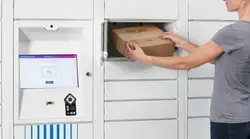
A smart locker system provides a secure, self-service way to manage deliveries, equipment loans, personal storage, order collections and returns. Software controls how compartments are assigned, who can access them, what notifications are sent and which activities are recorded. The workflow can be configured around what users need to do.
What is the difference between a parcel locker and a smart locker?
Parcel locker describes the use: storing parcels for delivery or collection. Smart locker describes a locker managed through connected software. A parcel locker can therefore be a smart locker. Other uses include equipment issue and return, day-use storage, click and collect, customer returns and paid storage.
How do I know whether smart lockers would suit my site?
Smart lockers are worth exploring when you need to reduce staff handovers, provide access outside staffed hours or keep clearer records of items and their use. That could mean equipment available between shifts, customer collections without queues or storage visitors can reserve before arriving. The assessment in this guide helps you identify which needs matter most at your site.
Can smart lockers be used for equipment and assets?
Yes. Laptops, scanners, tools, keys and other shared items can be issued and returned through lockers. Access permissions determine who can collect them, while records show collections and returns. Where equipment needs charging, cleaning or inspection, those steps form part of the process before it is made available to the next user.
How do day-use lockers work?
Employees, students or visitors use a compartment to store belongings during their working day, studies or visit. Depending on the setup, they can reserve a locker or choose one on arrival. Storage periods and access rules determine how long they can use it, whether they can reopen it and when it becomes available for the next user.
Can smart lockers support click and collect?
Yes. Staff prepare an order and place it in an assigned compartment. The customer receives collection details and retrieves it without waiting for a counter handover. This can support collections outside shop opening hours when the lockers are accessible independently of the shop.
Can customers return purchases through lockers?
Yes, where a returns workflow is provided. Customers deposit their purchases into an assigned compartment and receive confirmation of the drop-off. Staff or the responsible carrier collect the items afterwards. Inspection, acceptance of the return and any refund are handled separately from the locker deposit.
Can visitors reserve and pay for locker storage?
Yes, with a suitable booking and payment integration. For example, a museum or immersive attraction can let visitors reserve and pay for storage alongside their admission ticket. The booking connects with the locker system to arrange the reservation and access, so storage is organised before they arrive.
Can the same locker bank support different uses?
Yes, where the software and configuration support it. A workplace could combine parcel collection, equipment loans and personal storage. Compartments can be allocated to particular uses, with different access permissions and storage periods. Reserving capacity for each use helps prevent personal storage, for example, from filling the compartments needed for deliveries.
What is the difference between open and closed locker networks?
In parcel services, an open network offers collection or returns to the public through participating carriers or retailers. A closed network is dedicated to a defined group, such as residents, employees, students or customers.
Closed does not mean restricted to one courier. Pitney Bowes lockers operate on a closed network model, supporting multiple couriers while remaining dedicated to your users. They are not available for the general public to use as a parcel collection or returns point. Closed networks can also support equipment loans, personal storage and other controlled workflows.
Can different couriers deliver to the same lockers?
Yes. Pitney Bowes lockers can be configured for direct deliveries from multiple couriers. Couriers use a QR code or carrier access code to access the delivery process and deposit items for the intended recipients. The lockers remain dedicated to your users, regardless of which courier brings the delivery.
Can parcel lockers work in residential buildings with or without a concierge?
Yes. In buildings with a concierge, lockers reduce the time spent handing over parcels and answering collection enquiries, leaving more time for other resident services. Without an on-site team, a direct courier delivery workflow provides a secure deposit point. Residents receive collection details and retrieve their parcels without needing someone to hand them over.
Is there an app for administrators and locker users?
Yes. Pitney Bowes provides mobile apps for administrators managing locker activity and end users accessing the service. Administrators can manage lockers from a mobile device. End users can receive notifications, view their delivery history and open assigned lockers through the app, where enabled.
An app is not required for every user. Barcode, QR code, PIN or approved ID badge access can also be provided, depending on the setup.
Can smart lockers accommodate accessibility needs?
Yes. Pitney Bowes lockers offer options including accessible compartment allocation and audio-assisted controls. Accessible allocation helps place items in compartments the user can reach, while audio assistance supports users with visual impairments. The layout around the lockers also needs enough space to approach, operate the controls and open the doors.
What size and number of compartments do we need?
This depends on what you need to store, how many compartments will be occupied during busy periods and how long items remain inside. Equipment demand can peak at shift changes, visitor storage at arrival times and parcel storage during busy delivery periods. A mix of compartment sizes helps accommodate different items without using large compartments for everything.
Can smart lockers be installed outdoors?
Yes. Pitney Bowes offers outdoor lockers designed for weather exposure. An external location can provide convenient access for deliveries, order collections or visitor storage. Installation planning covers the surface, power, connectivity, lighting and access around the lockers. Outdoor lockers protect against weather exposure but do not automatically provide temperature-controlled storage.
Can lockers be branded to match our building or business?
Yes. Pitney Bowes lockers offer full or partial wraps, colours, logos and kiosk screen branding. These can reflect your business, residential development, campus or visitor venue, helping the lockers fit their surroundings and making the service recognisable to users.
Can smart lockers connect with our existing systems?
Yes. APIs connect Pitney Bowes lockers with your existing systems so locker access, reservations and activity records become part of the process you need. For example, approval of a laptop request in your IT system could trigger a locker reservation for collection. At an attraction, visitors could reserve and pay for storage through your ticket-booking system before they arrive.
How long does installation take?
There is no single timeframe for every site. The schedule depends on hardware availability, site preparation, the number of locations and any branding or integration work. Physical installation is followed by configuration, testing and staff training. Your installation plan should distinguish the time needed to supply and fit the lockers from the date the service will be ready to use.
Can we manage lockers across several sites?
Yes. Pitney Bowes locker software provides a central view of activity through a single platform. Different sites can support different workflows, such as equipment loans at one location and parcel collection or personal storage at another. Local teams can manage their lockers with appropriate permissions, while central teams review activity and reporting across sites.
What happens if an item is not collected, equipment is overdue or a storage period ends?
The response depends on the workflow and the rules you set. Uncollected orders or parcels can trigger reminders, while overdue equipment can be flagged for follow-up with the borrower. For personal storage, users need to know when their booking ends and what happens to belongings left behind. Your team manages any removal or further action under those arrangements.
What happens during a power or internet outage?
An outage can affect locker access, new bookings, notifications or updates to activity records. What continues working depends on the hardware, backup provision and software configuration. The proposed setup should specify which functions remain available and how authorised staff can help users retrieve items if normal access is interrupted.
How do smart lockers help investigate missing items or disputed handovers?
Activity records help establish when an item was deposited, accessed, collected or returned and which user or access credential was involved. This can help investigate an equipment loan, customer return or disputed delivery. Depending on the workflow, signatures or photographs can provide further evidence of the handover.
Can parcel lockers help keep communal areas and escape routes clear?
A designated parcel storage point can reduce deliveries left in corridors, stairwells and reception areas, helping reduce clutter and trip hazards. The lockers themselves must be suitably located and considered within the building’s fire risk assessment. Installing lockers does not, by itself, establish fire safety compliance.
Are smart lockers GDPR compliant?
Pitney Bowes lockers support GDPR-compliant data handling through access controls and configurable retention settings. You control who can access user details and locker activity records. Retention periods can be set to suit your data protection requirements.
Compliance also depends on how the service is used, including collecting only the information needed, explaining its use and handling requests from individuals about their data.
How much do smart lockers cost?
Pitney Bowes lockers are available from £180 per month, excluding VAT. Installation, configuration and integration services are charged separately. Your quote will depend on the locker configuration, workflows and site requirements, with a breakdown of what is included and any additional charges.
How do I build a business case for smart lockers?
Compare the full cost of installing and running lockers with your current arrangements. Include staff time spent on handovers, enquiries, equipment tracking and storage, alongside replacement costs for lost items. Identify the improvements you expect, such as extended access, clearer accountability or income from paid storage. Include the work that remains, such as loading orders, inspecting returned equipment and following up on overdue items.
Where can I find out more or arrange a demonstration?
Visit the Pitney Bowes smart locker hub for information on locker uses, configurations, software and security. Tell our team what you need to manage, who will use the lockers and where they will be installed. We can demonstrate the relevant workflows and discuss the options.
Sources
- Traizr, Parcel Data Report: What 224,604 Parcels Show. Figures above cover 209,686 items across eight London student accommodation sites, August 2024 to July 2026
- NHS England Digital, Implementing RTLS for asset tracking and capacity management, 24 April 2025
- NHS England, Amazon-style’ prescription tracking goes live in NHS App for millions of patients, 23 May 2025
- The Guardian, Thousands of UK government laptops, phones and tablets have been lost or stolen, 22 June 2025
- London Assembly, The impact of lost evidence on criminal cases, 15 July 2025.
- Ofcom, Post Monitoring Report: Postal services in the financial year 2024–25, 3 December 2025, pp. 2, 6 and 14 Citizens Advice, Parcel problems reach record as 15 million people are let down on the doorstep, 19 November 2025
- Pathfindr, Lost equipment costs UK manufacturing 350 million hours, 17 September 2024, updated 20 September 2024
- InternetRetailing, 79% of UK shoppers believe Click & Collect needs improving, 23 April 2024. Reports research by Clix Technologies; sample size and full methodology are not provided in the article.