
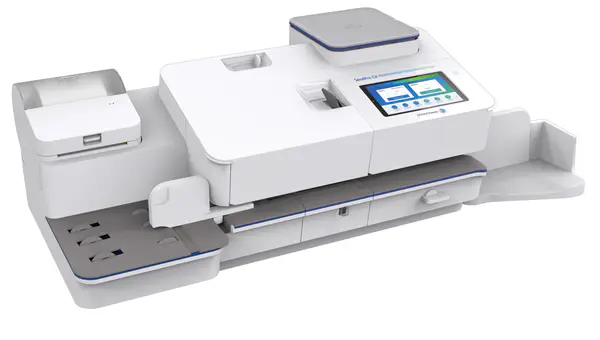
SendPro® CX 500
9V00Find solutions
 Top Articles
Install & Setup
Using Your Product
Fixing & Maintenance
Postage
Reporting, History & Accounting
Top Articles
Install & Setup
Using Your Product
Fixing & Maintenance
Postage
Reporting, History & Accounting
Top Articles
Use these network requirements to prepare your IT and local network environment for connecting your SendPro CX Series device to the internet.
Problems with the settings, the wireless connection, or a firewall may cause network connection issues.
Problems with the settings, the wired connection, or a firewall may cause network connection issues.
Check your ink, run a test pattern, and clean your printhead to resolve poor print issues on the SendPro CX Series
If you receive a message that your ink waste pad is full, follow these steps to change the pad.
Installation, Setting Up & Drivers
Keep your device turned on and connected to your network 24 hours a day to update software and USPS rates automatically. Your device checks for updates overnight.
Ensure that you feed envelopes correctly to help prevent feeding problems.
Run account reports to show how you spent your postage for a specific account or for all accounts over various time periods.
Use Print Labels to get the best pricing, free tracking, and detailed delivery history for USPS package services. You can also send via UPS® or FedEx®.
Your device uses two separate funding accounts. One is for shipping labels and one is for Print Postage. You cannot use the shipping label funds for Print Postage and vice versa.
Your device uses two separate funding accounts. One account is for shipping labels and the other account is for Print Postage. You cannot use the shipping label funds for Print Postage and vice versa.
SendPro CX devices have separate accounts for shipping and mailing. You must fund shipping label printing and postage printing functions separately.
If you use accounting, your SendPro CX can track mail runs by Job ID. Job IDs let you group and track categories that span multiple account names. This feature is often used to monitor project expenses shared across departments, such as client jobs or grants. Before printing postage, you can scan or manually enter the Job ID.
If you use Job IDs, you select it on the Print Postage screen. Depending on your account settings, you may be required to enter a Job ID before printing mail.
If you use accounting, your SendPro CX can track mail runs by Job ID. Job IDs let you group and track categories that span multiple account names. This feature is often used to monitor project expenses shared across departments, such as client jobs or grants. Before printing postage, you can scan or manually enter these Job IDs.
You can seal envelopes and print postage at the same time with your SendPro CX Series.
You can add a Print Postage account to track your costs for printing postage on envelopes.
The default refill amount can be set to store an amount you want to refill your device with.
You can change the system language between English and Spanish.
If you do not have enough postage on an envelope, you can add more postage directly on a blank area on your envelope or you can print the additional postage on a tape.
You can edit an account, sub account, or sub sub account through the Print Postage app.
If you need to change a sender address, you can edit it in the address book.
SendPro is the software that runs many features on your device. If you need to check which version you have, follow these steps.
If your package was returned by USPS, you can request a refund through PitneyShip within 45-days of the label creation date.
Use the Address Book app on your device to add single addresses. Use PitneyShip to import multiple addresses.
A favorite is a set of commonly-used settings saved as a template that you can use to more quickly select the same settings in the future. Favorites can contain the postage class, postage value, extra services, and graphic. The maximum number of favorites you can have is 21, including the default preset.
Admin users can add, modify, delete and manage user profiles in the system as needed.
Please chat with us if your device prints the incorrect ZIP Code.
Print a funds report if you need a report showing the total number of mailpieces sent.
You can view receipts for all the times when you have refilled postage for yourPrint Postage account.
Follow these steps to print a scale report on the SendPro CX Series.
Your device saves energy when it enters sleep mode. Sleep mode turns your device off after a period of inactivity, reducing its ability to upload transactions and receive updates.
Your device can be set to logout the current user when it enters timeout mode. Timeout logs you out of the device after a period of inactivity, this keeps your device and account secure.
You can upload a new graphic to your device by signing in to your account, selecting the appropriate meter, and using the MyGraphics tool to upload, customize, and publish your image.
View a report showing all your postage refill history.
Add a text message to print a return address or to print your own personalised message. Your message must comply with the postal rules for your country.
Advance the date to print postage up to thirty days before you need to send it.
You can cancel a UPS or FedEx shipping label to stop the postage appearing on your UPS or FedEx invoice.
Reset the piece counter to delete the piece count information.
You can compare postage rates for various classes and services when printing postage using the Print Postage app.
You can check to see if you have downloaded the latest rates for each postal class on your device.
You can delete an account, sub account, or sub sub account through the Print Postage app.
Your device allows you to add a custom text message to your mail. You can edit or delete messages you no longer need.
The Differential Weighing Threshold is the minimum weight each mailpiece must weigh when using Differential Weighing. It can be set in 0.1 ounce increments, between 0.1 and 8.8 ounces.
Enter the weight of a mailpiece when you know its weight and are not using the scale.
The MAC address is the network identifier for the device. IT uses it to allow the device onto the network.
Follow these steps to show an auditor the required Certificate of Conformance (CC) information for a systems weights & measures build on the SendPro CX Series.
Setting the account status to inactive prevents anyone from charging postage against an account.
Customise your mail by adding a custom logo or standard graphic.
If you already printed today’s date and postage on an envelope, but you missed your mail pickup, you can re-date the mail.
Set the low funds warning to warn you when your available funds for printing postage reaches a certain amount. Use this warning as a reminder to add more postage to your device.
You can define the print options for your shipping labels. This includes the label size and whether to print the cost on the label. You can also choose to print a receipt or enable scan form and manifest printing.
Your Mailer ID is a unique number that you need when using Electronic Return Receipt (ERR). It is used to identify your business in USPS mailing systems.
Upload the system logs if a Pitney Bowes representative requires them.
You can use Differential Weighing to process mixed weight mail more efficiently. Your device calculates the correct weight and price as you remove and print each mailpiece from the scale.
Check your funds for printing postage on your device at any time.
The purpose of the USPS Shipment Confirmation Acceptance Notice (SCAN) Form 5630 is to save time. Without SCAN Form 5630, the USPS needs to scan each individual shipping label. This can be time consuming if there are a large number of shipping labels. Instead of scanning each individual shipping label, SCAN Form 5630 can be scanned once by USPS, and every shipping label from that day will be uploaded to the USPS systems.
Before you select a rate for a large envelope, you need to determine whether the mailpiece you are sending is a letter or large envelope according to the USPS.
You can track the packages you sent with shipping labels on your device.
Familiarize yourself with the parts of your SendPro CX 500.
Follow these steps to add, edit or remove a surcharge or discount from the selected job on the screen before printing. Surcharges can also be added to favorites.
Review the specifications of your SendPro CX 500 including the throughput, ink cartridge yield, and other component details.
Use the Network Connection app to check that you have the necessary internet services to connect to the internet. The app helps diagnose network connection issues.
Add a network when you want to connect using Wi-Fi and your network is not present in the Wi-Fi list.
A proxy server is a computer that acts as a gateway between your local network, your device, and the internet.
You can connect your device via a wireless network connection.
You can use a network cable to connect your device to the Pitney Bowes Data Center.
You can install a scale when it wasn’t set up during the initial product installation or when you need to replace an existing scale on your device. Your device contains step-by-step installation instructions for compatible scales.
Create a security password (or PIN) to prevent unauthorised use of your device.
Professional service is required to prepare your SendPro CX 500 for transport. Contact Pitney Bowes if you are planning to move your SendPro CX 500.
If you are upgrading to SendPro CX Series from an older SendPro device, you must first withdraw your funds from the old device to your Pitney Bowes account and then add them to your SendPro CX Series.
Set the right margin adjustment to move the print further away from the right side of your envelopes. This can be helpful when printing thick mail.
If you clean the print nozzles and you still get a bad test print pattern, try cleaning the printhead.
Check the ink level to ensure you have enough ink in your device.
You can make a test print to check the quality of the postage printed on an envelope or tape strip.
You may need to install a new printhead to replace the existing one when print quality declines.
Replace the ink cartridge when the low ink warning appears. This ensures your device is in optimal working condition.
Network & Connectivity
Use these network requirements to prepare your IT and local network environment for connecting your SendPro CX Series device to the internet.
Use the Network Connection app to check that you have the necessary internet services to connect to the internet. The app helps diagnose network connection issues.
Add a network when you want to connect using Wi-Fi and your network is not present in the Wi-Fi list.
Find the answers to frequently asked questions about networking and connectivity.
Checking the power, reestablishing connection, and improving reception often resolves connection issues when using a SendPro Cellular CDSP (orange device).
A proxy server is a computer that acts as a gateway between your local network, your device, and the internet.
You can connect your device via a wireless network connection.
You can use a network cable to connect your device to the Pitney Bowes Data Center.
Features & Settings
You can change the system language between English and Spanish.
Admin users can add, modify, delete and manage user profiles in the system as needed.
Your device saves energy when it enters sleep mode. Sleep mode turns your device off after a period of inactivity, reducing its ability to upload transactions and receive updates.
Your device can be set to logout the current user when it enters timeout mode. Timeout logs you out of the device after a period of inactivity, this keeps your device and account secure.
The Differential Weighing Threshold is the minimum weight each mailpiece must weigh when using Differential Weighing. It can be set in 0.1 ounce increments, between 0.1 and 8.8 ounces.
You can define the print options for your shipping labels. This includes the label size and whether to print the cost on the label. You can also choose to print a receipt or enable scan form and manifest printing.
Your Mailer ID is a unique number that you need when using Electronic Return Receipt (ERR). It is used to identify your business in USPS mailing systems.
Upload the system logs if a Pitney Bowes representative requires them.
Set the brightness of the display to suit your work space.
When you move your device to a new location or install a new scale, you must modify the scale location and time zone values.
Create a security password (or PIN) to prevent unauthorised use of your device.
Set the right margin adjustment to move the print further away from the right side of your envelopes. This can be helpful when printing thick mail.
Follow these steps to print a scale report on the SendPro CX Series.
You can use Differential Weighing to process mixed weight mail more efficiently. Your device calculates the correct weight and price as you remove and print each mailpiece from the scale.
Zero the scale to set the weight to zero.
You can install a scale when it wasn’t set up during the initial product installation or when you need to replace an existing scale on your device. Your device contains step-by-step installation instructions for compatible scales.
You can seal envelopes and print postage at the same time with your SendPro CX Series.
Use Seal Only mode to seal envelopes without printing anything.
Use the moistener on your device to seal your envelopes before you print postage.
You can create a shipping label or print postage from the Home screen.
Keep your device turned on and connected to your network 24 hours a day to update software and USPS rates automatically. Your device checks for updates overnight.
As well as printing postage, your device uses other ways to print and feed mail. Tap Print Mode in the Print Postage app to see the available options.
SendPro is the software that runs many features on your device. If you need to check which version you have, follow these steps.
Please chat with us if your device prints the incorrect ZIP Code.
The MAC address is the network identifier for the device. IT uses it to allow the device onto the network.
Follow these steps to show an auditor the required Certificate of Conformance (CC) information for a systems weights & measures build on the SendPro CX Series.
Familiarize yourself with the parts of your SendPro CX 500.
Review the material specifications including the minimum and maximum envelope sizes, envelope stack height, and tape size details.
Familiarize yourself with the ports on the back of your device.
Familiarize yourself with the parts of your SendPro CX 500.
Look on your mailing system to find the serial number and Product Code Number (PCN).
Review the specifications of your SendPro CX 500 including the throughput, ink cartridge yield, and other component details.
Use postal approved ink cartridges. Non-postal approved ink cartridges can damage your device.
If you need to change a sender address, you can edit it in the address book.
Use the Address Book app on your device to add single addresses. Use PitneyShip to import multiple addresses.
You can set the recipient's address as a default address for all of your USPS return labels.
Printing
Check the ink level to ensure you have enough ink in your device.
Replace the ink cartridge when the low ink warning appears. This ensures your device is in optimal working condition.
If it is not possible to print postage directly onto your envelope, you can print it onto a tape. You can then apply the tape to the envelope.
If you do not have enough postage on an envelope, you can add more postage directly on a blank area on your envelope or you can print the additional postage on a tape.
You can upload a new graphic to your device by signing in to your account, selecting the appropriate meter, and using the MyGraphics tool to upload, customize, and publish your image.
Add a text message to print a return address or to print your own personalised message. Your message must comply with the postal rules for your country.
Your device allows you to add a custom text message to your mail. You can edit or delete messages you no longer need.
Customise your mail by adding a custom logo or standard graphic.
You can define the print options for your shipping labels. This includes the label size and whether to print the cost on the label. You can also choose to print a receipt or enable scan form and manifest printing.
Print a test pattern to see if the printhead is working properly or if you have enough ink in the cartridge.
If a label does not print correctly, you can print it again.
Inscriptions appear automatically when you select certain classes of mail. This saves you time and helps you always use the correct inscription.
If you wish to use a pre-printed return envelope, card, or label on which the postage is prepaid, you must print the postage without a date.
Ensure the cover is closed and clean the printhead to resolve poor print issues.
Learn how to resolve poor print quality on the PB-SP100 label printer.
Mailing & Shipping
Use Print Labels to get the best pricing, free tracking, and detailed delivery history for USPS package services. You can also send via UPS® or FedEx®.
Your device uses two separate funding accounts. One is for shipping labels and one is for Print Postage. You cannot use the shipping label funds for Print Postage and vice versa.
If you use accounting, your SendPro CX can track mail runs by Job ID. Job IDs let you group and track categories that span multiple account names. This feature is often used to monitor project expenses shared across departments, such as client jobs or grants. Before printing postage, you can scan or manually enter the Job ID.
If you use Job IDs, you select it on the Print Postage screen. Depending on your account settings, you may be required to enter a Job ID before printing mail.
If you use accounting, your SendPro CX can track mail runs by Job ID. Job IDs let you group and track categories that span multiple account names. This feature is often used to monitor project expenses shared across departments, such as client jobs or grants. Before printing postage, you can scan or manually enter these Job IDs.
Certified Mail is a USPS service that provides you with proof of mailing by sending you a receipt once your mailpiece arrives at its destination.
You can edit an account, sub account, or sub sub account through the Print Postage app.
If your package was returned by USPS, you can request a refund through PitneyShip within 45-days of the label creation date.
A favorite is a set of commonly-used settings saved as a template that you can use to more quickly select the same settings in the future. Favorites can contain the postage class, postage value, extra services, and graphic. The maximum number of favorites you can have is 21, including the default preset.
Advance the date to print postage up to thirty days before you need to send it.
You can cancel a UPS or FedEx shipping label to stop the postage appearing on your UPS or FedEx invoice.
Reset the piece counter to delete the piece count information.
You can compare postage rates for various classes and services when printing postage using the Print Postage app.
You can check to see if you have downloaded the latest rates for each postal class on your device.
You can delete an account, sub account, or sub sub account through the Print Postage app.
Enter the weight of a mailpiece when you know its weight and are not using the scale.
If you already printed today’s date and postage on an envelope, but you missed your mail pickup, you can re-date the mail.
You can use Differential Weighing to process mixed weight mail more efficiently. Your device calculates the correct weight and price as you remove and print each mailpiece from the scale.
The purpose of the USPS Shipment Confirmation Acceptance Notice (SCAN) Form 5630 is to save time. Without SCAN Form 5630, the USPS needs to scan each individual shipping label. This can be time consuming if there are a large number of shipping labels. Instead of scanning each individual shipping label, SCAN Form 5630 can be scanned once by USPS, and every shipping label from that day will be uploaded to the USPS systems.
Before you select a rate for a large envelope, you need to determine whether the mailpiece you are sending is a letter or large envelope according to the USPS.
You can track the packages you sent with shipping labels on your device.
Sign in to print shipping labels. Signing out prevents unauthorized printing of shipping labels.
If a label does not print correctly, you can print it again.
If you need to provide a USPS return shipping label for someone to ship something back to you, you can print a return label.
First-Class Mail is an economical way to send mailpieces through the USPS.
Use this process if you need to send mail from the United States to a different country.
Use Electronic Return Receipt (ERR) if you need evidence of delivery, along with information about the recipient's actual delivery address.
Follow these steps to add, edit or remove a surcharge or discount from the selected job on the screen before printing. Surcharges can also be added to favorites.
Network & Connectivity
Use these network requirements to prepare your IT and local network environment for connecting your SendPro CX Series device to the internet.
Use the Network Connection app to check that you have the necessary internet services to connect to the internet. The app helps diagnose network connection issues.
Add a network when you want to connect using Wi-Fi and your network is not present in the Wi-Fi list.
Find the answers to frequently asked questions about networking and connectivity.
Checking the power, reestablishing connection, and improving reception often resolves connection issues when using a SendPro Cellular CDSP (orange device).
A proxy server is a computer that acts as a gateway between your local network, your device, and the internet.
You can connect your device via a wireless network connection.
You can use a network cable to connect your device to the Pitney Bowes Data Center.
Printing
If it is not possible to print postage directly onto your envelope, you can print it onto a tape. You can then apply the tape to the envelope.
If you do not have enough postage on an envelope, you can add more postage directly on a blank area on your envelope or you can print the additional postage on a tape.
You can upload a new graphic to your device by signing in to your account, selecting the appropriate meter, and using the MyGraphics tool to upload, customize, and publish your image.
Add a text message to print a return address or to print your own personalised message. Your message must comply with the postal rules for your country.
Your device allows you to add a custom text message to your mail. You can edit or delete messages you no longer need.
Customise your mail by adding a custom logo or standard graphic.
You can define the print options for your shipping labels. This includes the label size and whether to print the cost on the label. You can also choose to print a receipt or enable scan form and manifest printing.
Print a test pattern to see if the printhead is working properly or if you have enough ink in the cartridge.
If a label does not print correctly, you can print it again.
Inscriptions appear automatically when you select certain classes of mail. This saves you time and helps you always use the correct inscription.
If you wish to use a pre-printed return envelope, card, or label on which the postage is prepaid, you must print the postage without a date.
Ensure the cover is closed and clean the printhead to resolve poor print issues.
Learn how to resolve poor print quality on the PB-SP100 label printer.
Check the ink level to ensure you have enough ink in your device.
Replace the ink cartridge when the low ink warning appears. This ensures your device is in optimal working condition.
Errors & Troubleshooting
If you see one of these error codes or messages, you may have a network connection issue or you may need to connect to Pitney Bowes.
If you see error 3F3D, reboot your device.
Check your connections and reboot the device to resolve this issue. The errors BA00, BA04 or BA05 appear because the base is disconnected from the tablet.
Reseating the printhead and ink cartridge can often resolve a Fatal Printer error.
If you see the error "Barcode invalid" when sending Electronic Certified Mail, ensure you are using the latest PS form 3800.
Refill your device for a smaller amount or add funds to your postage account if the Something Went Wrong: There are insufficient funds to complete your refill message Error 188A appears.
If the "No PSD" message appears and the device will not function, disconnect your network connection, reboot the device, upload your data, and perform a postage refill.
Signing out of shipping labels then restarting your device can resolve the "Oops! Something went wrong" message.
If you are seeing error PSD00, reboot your device and perform a postage refill.
A installation did not complete on your SendPro CX Series. You may be able to clear the error by updating and restarting your meter.
If error 1805 appears and the device will not refill funds or sync data, reboot your device and sync the data again.
Contact Pitney Bowes if error 1827 appears.
Reboot your device if error 51 appears.
Restart the device, complete the installation process and manually download rates and updates to resolve error BA06.
Problems with the settings, the wired connection, or a firewall may cause network connection issues.
Problems with the settings, the wireless connection, or a firewall may cause network connection issues.
Remove the stuck tape from the device if Tape Transport error appears.
If you see the error "Clear Paper Jam," an envelope or label may be stuck in the transport deck.
A flashing power light is often caused by holding the power button down for longer than five seconds.
Learn how to resolve poor print quality on the PB-SP100 label printer.
Check your ink, run a test pattern, and clean your printhead to resolve poor print issues on the SendPro CX Series
Replace an empty ink cartridge. Also, remove the ink cartridge and printhead and check the gold pins underneath are not bent if you see the message "Ink Out" or "Ink tank not installed.
Restarting your device then refilling the postage can often resolve the mailing has stopped or CSD-Mailing Prod has stopped errors.
If you are seeing the message, "Something went wrong" when signing into shipping labels, contact Pitney Bowes technical support for assistance.
Perform a balance inquiry, restart your device and check for software updates to resolve errors VR01 or VR04.
Reboot your device, level the scale, zero the scale and check any USB cables if your scale is not weighing mail correctly.
Reboot your device if the scale weight changes to one ounce after removing a mailpiece.
Reboot your device if the ink cartridge does not move on start up.
Restart your device if it is frozen on the clock screen.
The meter is displaying an Android recovery error message when you tried to reboot it.
Not ready to print" appears because you need to clear a jam, check the ink or printhead, select an account, or upload transactions.
Please chat with us if the message PSD disabled appears.
Ensure you install the correct ink cartridge if the Ink Tank Error or Unknown ink cartridge messages appear.
If the Home screen does not appear when you turn on the device, reboot your device.
Reboot your device and verify the sender address to resolve the message Please wait when printing shipping labels.
If you see the message "Sync your data," it may mean that your system has been offline and has not uploaded your postage printing transactions recently. It could also mean that you are experiencing connection issues.
Try restarting the device if the touchscreen is not responding
The device may not have an internet connection, or you may need to upload Print Postage postage transactions if you cannot refill your postage funds.
Check the default label size, connect the label printer USB cable to a different USB port, reboot the device and ensure the labels are loaded correctly if you are unable to print shipping labels.
The SendPro C Series or SendPro CX Series is turned off or does not have power.
Maintenance
Ensure that you feed envelopes correctly to help prevent feeding problems.
Use the feeder to automatically print a stack of mail.
Print a test pattern to see if the printhead is working properly or if you have enough ink in the cartridge.
If you clean the print nozzles and you still get a bad test print pattern, try cleaning the printhead.
Your device will need refills of EZ Seal® in order to seal envelopes. Follow these steps to fill the moistener tank.
If the moistener tank is full and your envelopes are not sealing properly, clean the moistener brush and wick.
You can make a test print to check the quality of the postage printed on an envelope or tape strip.
Use postal approved ink cartridges. Non-postal approved ink cartridges can damage your device.
Replace the ink cartridge when the low ink warning appears. This ensures your device is in optimal working condition.
You can seal envelopes and print postage at the same time with your SendPro CX Series.
Use Seal Only mode to seal envelopes without printing anything.
Use the moistener on your device to seal your envelopes before you print postage.
Refilling Postage
Your device uses two separate funding accounts. One account is for shipping labels and the other account is for Print Postage. You cannot use the shipping label funds for Print Postage and vice versa.
SendPro CX devices have separate accounts for shipping and mailing. You must fund shipping label printing and postage printing functions separately.
The default refill amount can be set to store an amount you want to refill your device with.
Print a funds report if you need a report showing the total number of mailpieces sent.
You can view receipts for all the times when you have refilled postage for yourPrint Postage account.
Set the low funds warning to warn you when your available funds for printing postage reaches a certain amount. Use this warning as a reminder to add more postage to your device.
Check your funds for printing postage on your device at any time.
Your device automatically uploads your postage printing transactions at least once during the day and once after hours.
You can apply to the USPS for a refund if your mail is damaged or incorrectly printed.
Please chat with us if the message Something Went Wrong: There is an issue with your postage account (Error 1882) appears.
If you are upgrading to SendPro CX Series from an older SendPro device, you must first withdraw your funds from the old device to your Pitney Bowes account and then add them to your SendPro CX Series.
Rate Change
Keep your device turned on and connected to your network 24 hours a day to update software and USPS rates automatically. Your device checks for updates overnight.
You can check to see if you have downloaded the latest rates for each postal class on your device.
Reporting, History & Accounting
You can add a Print Postage account to track your costs for printing postage on envelopes.
You can delete an account, sub account, or sub sub account through the Print Postage app.
Setting the account status to inactive prevents anyone from charging postage against an account.
Cost Accounts help you keep track of where you’re spending your money on postage by allowing you to assign shipping label costs.
Run account reports to show how you spent your postage for a specific account or for all accounts over various time periods.
Follow these steps to print a scale report on the SendPro CX Series.
View a report showing all your postage refill history.
You can view and print all the USPS shipping label refunds you have requested on your device.
You can view and print a report of the shipping labels you have created on your device using the Shipping History app.
Documents and Software
For information on service offerings and level of support, download the Pitney Bowes Technical Support Overview